Standard Model 2 QR codes have 40 versions, from 21×21 to 177×177 modules. Calculate the version your content needs, then compare every size and single-mode capacity at L, M, Q and H.
By the QRacade team · Updated November 14, 2026 · Values computed with our Nayuki-based encoder and checked against DENSO WAVE's reference
The version formula and grid sizes
A QR code's version determines its number of modules per side. A module is one small square in the grid; the blank quiet zone around the symbol is not included in the version dimensions.
modules per side = 17 + 4 × version
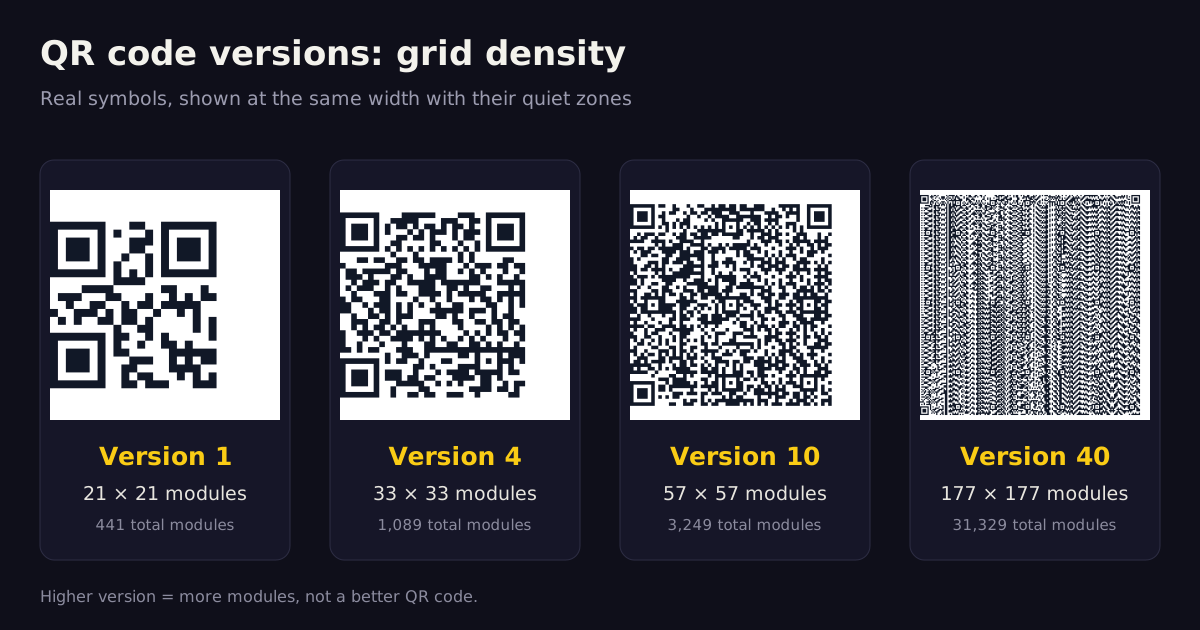
Version 1 is therefore 21×21 (441 modules), while Version 40 is 177×177 (31,329 modules). Versions 7 and above also include encoded version information, and larger versions use more alignment patterns to help readers interpret the grid.
Real QR symbols rendered by QRacade's encoder at four versions. At the same display width, a higher version means smaller modules — not a better code.
QR code version calculator
Paste the actual content. The calculator uses the same Nayuki-based engine as our generator to find the minimum version that fits at each error correction level. Nothing is uploaded.
The remaining-bit figure is the unused data capacity after the segment header and payload. It is not a recommendation to fill the code: real-world scanning also depends on print size, contrast, quiet zone, surface and reader.
How to choose a QR code version
Measure the real payload. Numeric, alphanumeric and byte modes pack data differently. Lowercase URLs normally use byte mode, and Unicode content is measured as UTF-8 bytes.
Choose error correction for the environment. L, M, Q and H reserve increasing amounts of recovery information. A higher level can require a higher version, but there is no fixed version gap between any two levels.
Use the smallest version that fits, then test the output. A lower version has larger modules at the same physical width. The final print, material, lighting and intended reader still determine whether it scans reliably.
For example, DENSO WAVE's version guide uses 100 numeric digits at Level M: Version 3 is the closest fit because its numeric capacity is 101. A URL with the same number of characters can require a different version because it uses another encoding mode.
Complete v1 to v40 QR code capacity tables
These are maximum single-mode capacities, not recommended payload sizes for every use. “Byte” is binary byte mode; “Kanji” is the standard Kanji mode, not a general count of Unicode characters. Mixed or segmented content must be calculated from its actual bit stream.
On small screens, scroll the table horizontally. The Version column stays visible.
Level L — about 7% approximate recovery capability
Version
Grid
Total modules
With quiet zone
Data codewords
Numeric
Alphanumeric
Byte
Kanji
v1
21 × 21
441
29 × 29
19
41
25
17
10
v2
25 × 25
625
33 × 33
34
77
47
32
20
v3
29 × 29
841
37 × 37
55
127
77
53
32
v4
33 × 33
1,089
41 × 41
80
187
114
78
48
v5
37 × 37
1,369
45 × 45
108
255
154
106
65
v6
41 × 41
1,681
49 × 49
136
322
195
134
82
v7
45 × 45
2,025
53 × 53
156
370
224
154
95
v8
49 × 49
2,401
57 × 57
194
461
279
192
118
v9
53 × 53
2,809
61 × 61
232
552
335
230
141
v10
57 × 57
3,249
65 × 65
274
652
395
271
167
v11
61 × 61
3,721
69 × 69
324
772
468
321
198
v12
65 × 65
4,225
73 × 73
370
883
535
367
226
v13
69 × 69
4,761
77 × 77
428
1,022
619
425
262
v14
73 × 73
5,329
81 × 81
461
1,101
667
458
282
v15
77 × 77
5,929
85 × 85
523
1,250
758
520
320
v16
81 × 81
6,561
89 × 89
589
1,408
854
586
361
v17
85 × 85
7,225
93 × 93
647
1,548
938
644
397
v18
89 × 89
7,921
97 × 97
721
1,725
1,046
718
442
v19
93 × 93
8,649
101 × 101
795
1,903
1,153
792
488
v20
97 × 97
9,409
105 × 105
861
2,061
1,249
858
528
v21
101 × 101
10,201
109 × 109
932
2,232
1,352
929
572
v22
105 × 105
11,025
113 × 113
1,006
2,409
1,460
1,003
618
v23
109 × 109
11,881
117 × 117
1,094
2,620
1,588
1,091
672
v24
113 × 113
12,769
121 × 121
1,174
2,812
1,704
1,171
721
v25
117 × 117
13,689
125 × 125
1,276
3,057
1,853
1,273
784
v26
121 × 121
14,641
129 × 129
1,370
3,283
1,990
1,367
842
v27
125 × 125
15,625
133 × 133
1,468
3,517
2,132
1,465
902
v28
129 × 129
16,641
137 × 137
1,531
3,669
2,223
1,528
940
v29
133 × 133
17,689
141 × 141
1,631
3,909
2,369
1,628
1,002
v30
137 × 137
18,769
145 × 145
1,735
4,158
2,520
1,732
1,066
v31
141 × 141
19,881
149 × 149
1,843
4,417
2,677
1,840
1,132
v32
145 × 145
21,025
153 × 153
1,955
4,686
2,840
1,952
1,201
v33
149 × 149
22,201
157 × 157
2,071
4,965
3,009
2,068
1,273
v34
153 × 153
23,409
161 × 161
2,191
5,253
3,183
2,188
1,347
v35
157 × 157
24,649
165 × 165
2,306
5,529
3,351
2,303
1,417
v36
161 × 161
25,921
169 × 169
2,434
5,836
3,537
2,431
1,496
v37
165 × 165
27,225
173 × 173
2,566
6,153
3,729
2,563
1,577
v38
169 × 169
28,561
177 × 177
2,702
6,479
3,927
2,699
1,661
v39
173 × 173
29,929
181 × 181
2,812
6,743
4,087
2,809
1,729
v40
177 × 177
31,329
185 × 185
2,956
7,089
4,296
2,953
1,817
Level M — about 15% approximate recovery capability
Version
Grid
Total modules
With quiet zone
Data codewords
Numeric
Alphanumeric
Byte
Kanji
v1
21 × 21
441
29 × 29
16
34
20
14
8
v2
25 × 25
625
33 × 33
28
63
38
26
16
v3
29 × 29
841
37 × 37
44
101
61
42
26
v4
33 × 33
1,089
41 × 41
64
149
90
62
38
v5
37 × 37
1,369
45 × 45
86
202
122
84
52
v6
41 × 41
1,681
49 × 49
108
255
154
106
65
v7
45 × 45
2,025
53 × 53
124
293
178
122
75
v8
49 × 49
2,401
57 × 57
154
365
221
152
93
v9
53 × 53
2,809
61 × 61
182
432
262
180
111
v10
57 × 57
3,249
65 × 65
216
513
311
213
131
v11
61 × 61
3,721
69 × 69
254
604
366
251
155
v12
65 × 65
4,225
73 × 73
290
691
419
287
177
v13
69 × 69
4,761
77 × 77
334
796
483
331
204
v14
73 × 73
5,329
81 × 81
365
871
528
362
223
v15
77 × 77
5,929
85 × 85
415
991
600
412
254
v16
81 × 81
6,561
89 × 89
453
1,082
656
450
277
v17
85 × 85
7,225
93 × 93
507
1,212
734
504
310
v18
89 × 89
7,921
97 × 97
563
1,346
816
560
345
v19
93 × 93
8,649
101 × 101
627
1,500
909
624
384
v20
97 × 97
9,409
105 × 105
669
1,600
970
666
410
v21
101 × 101
10,201
109 × 109
714
1,708
1,035
711
438
v22
105 × 105
11,025
113 × 113
782
1,872
1,134
779
480
v23
109 × 109
11,881
117 × 117
860
2,059
1,248
857
528
v24
113 × 113
12,769
121 × 121
914
2,188
1,326
911
561
v25
117 × 117
13,689
125 × 125
1,000
2,395
1,451
997
614
v26
121 × 121
14,641
129 × 129
1,062
2,544
1,542
1,059
652
v27
125 × 125
15,625
133 × 133
1,128
2,701
1,637
1,125
692
v28
129 × 129
16,641
137 × 137
1,193
2,857
1,732
1,190
732
v29
133 × 133
17,689
141 × 141
1,267
3,035
1,839
1,264
778
v30
137 × 137
18,769
145 × 145
1,373
3,289
1,994
1,370
843
v31
141 × 141
19,881
149 × 149
1,455
3,486
2,113
1,452
894
v32
145 × 145
21,025
153 × 153
1,541
3,693
2,238
1,538
947
v33
149 × 149
22,201
157 × 157
1,631
3,909
2,369
1,628
1,002
v34
153 × 153
23,409
161 × 161
1,725
4,134
2,506
1,722
1,060
v35
157 × 157
24,649
165 × 165
1,812
4,343
2,632
1,809
1,113
v36
161 × 161
25,921
169 × 169
1,914
4,588
2,780
1,911
1,176
v37
165 × 165
27,225
173 × 173
1,992
4,775
2,894
1,989
1,224
v38
169 × 169
28,561
177 × 177
2,102
5,039
3,054
2,099
1,292
v39
173 × 173
29,929
181 × 181
2,216
5,313
3,220
2,213
1,362
v40
177 × 177
31,329
185 × 185
2,334
5,596
3,391
2,331
1,435
Level Q — about 25% approximate recovery capability
Version
Grid
Total modules
With quiet zone
Data codewords
Numeric
Alphanumeric
Byte
Kanji
v1
21 × 21
441
29 × 29
13
27
16
11
7
v2
25 × 25
625
33 × 33
22
48
29
20
12
v3
29 × 29
841
37 × 37
34
77
47
32
20
v4
33 × 33
1,089
41 × 41
48
111
67
46
28
v5
37 × 37
1,369
45 × 45
62
144
87
60
37
v6
41 × 41
1,681
49 × 49
76
178
108
74
45
v7
45 × 45
2,025
53 × 53
88
207
125
86
53
v8
49 × 49
2,401
57 × 57
110
259
157
108
66
v9
53 × 53
2,809
61 × 61
132
312
189
130
80
v10
57 × 57
3,249
65 × 65
154
364
221
151
93
v11
61 × 61
3,721
69 × 69
180
427
259
177
109
v12
65 × 65
4,225
73 × 73
206
489
296
203
125
v13
69 × 69
4,761
77 × 77
244
580
352
241
149
v14
73 × 73
5,329
81 × 81
261
621
376
258
159
v15
77 × 77
5,929
85 × 85
295
703
426
292
180
v16
81 × 81
6,561
89 × 89
325
775
470
322
198
v17
85 × 85
7,225
93 × 93
367
876
531
364
224
v18
89 × 89
7,921
97 × 97
397
948
574
394
243
v19
93 × 93
8,649
101 × 101
445
1,063
644
442
272
v20
97 × 97
9,409
105 × 105
485
1,159
702
482
297
v21
101 × 101
10,201
109 × 109
512
1,224
742
509
314
v22
105 × 105
11,025
113 × 113
568
1,358
823
565
348
v23
109 × 109
11,881
117 × 117
614
1,468
890
611
376
v24
113 × 113
12,769
121 × 121
664
1,588
963
661
407
v25
117 × 117
13,689
125 × 125
718
1,718
1,041
715
440
v26
121 × 121
14,641
129 × 129
754
1,804
1,094
751
462
v27
125 × 125
15,625
133 × 133
808
1,933
1,172
805
496
v28
129 × 129
16,641
137 × 137
871
2,085
1,263
868
534
v29
133 × 133
17,689
141 × 141
911
2,181
1,322
908
559
v30
137 × 137
18,769
145 × 145
985
2,358
1,429
982
604
v31
141 × 141
19,881
149 × 149
1,033
2,473
1,499
1,030
634
v32
145 × 145
21,025
153 × 153
1,115
2,670
1,618
1,112
684
v33
149 × 149
22,201
157 × 157
1,171
2,805
1,700
1,168
719
v34
153 × 153
23,409
161 × 161
1,231
2,949
1,787
1,228
756
v35
157 × 157
24,649
165 × 165
1,286
3,081
1,867
1,283
790
v36
161 × 161
25,921
169 × 169
1,354
3,244
1,966
1,351
832
v37
165 × 165
27,225
173 × 173
1,426
3,417
2,071
1,423
876
v38
169 × 169
28,561
177 × 177
1,502
3,599
2,181
1,499
923
v39
173 × 173
29,929
181 × 181
1,582
3,791
2,298
1,579
972
v40
177 × 177
31,329
185 × 185
1,666
3,993
2,420
1,663
1,024
Level H — about 30% approximate recovery capability
Version
Grid
Total modules
With quiet zone
Data codewords
Numeric
Alphanumeric
Byte
Kanji
v1
21 × 21
441
29 × 29
9
17
10
7
4
v2
25 × 25
625
33 × 33
16
34
20
14
8
v3
29 × 29
841
37 × 37
26
58
35
24
15
v4
33 × 33
1,089
41 × 41
36
82
50
34
21
v5
37 × 37
1,369
45 × 45
46
106
64
44
27
v6
41 × 41
1,681
49 × 49
60
139
84
58
36
v7
45 × 45
2,025
53 × 53
66
154
93
64
39
v8
49 × 49
2,401
57 × 57
86
202
122
84
52
v9
53 × 53
2,809
61 × 61
100
235
143
98
60
v10
57 × 57
3,249
65 × 65
122
288
174
119
74
v11
61 × 61
3,721
69 × 69
140
331
200
137
85
v12
65 × 65
4,225
73 × 73
158
374
227
155
96
v13
69 × 69
4,761
77 × 77
180
427
259
177
109
v14
73 × 73
5,329
81 × 81
197
468
283
194
120
v15
77 × 77
5,929
85 × 85
223
530
321
220
136
v16
81 × 81
6,561
89 × 89
253
602
365
250
154
v17
85 × 85
7,225
93 × 93
283
674
408
280
173
v18
89 × 89
7,921
97 × 97
313
746
452
310
191
v19
93 × 93
8,649
101 × 101
341
813
493
338
208
v20
97 × 97
9,409
105 × 105
385
919
557
382
235
v21
101 × 101
10,201
109 × 109
406
969
587
403
248
v22
105 × 105
11,025
113 × 113
442
1,056
640
439
270
v23
109 × 109
11,881
117 × 117
464
1,108
672
461
284
v24
113 × 113
12,769
121 × 121
514
1,228
744
511
315
v25
117 × 117
13,689
125 × 125
538
1,286
779
535
330
v26
121 × 121
14,641
129 × 129
596
1,425
864
593
365
v27
125 × 125
15,625
133 × 133
628
1,501
910
625
385
v28
129 × 129
16,641
137 × 137
661
1,581
958
658
405
v29
133 × 133
17,689
141 × 141
701
1,677
1,016
698
430
v30
137 × 137
18,769
145 × 145
745
1,782
1,080
742
457
v31
141 × 141
19,881
149 × 149
793
1,897
1,150
790
486
v32
145 × 145
21,025
153 × 153
845
2,022
1,226
842
518
v33
149 × 149
22,201
157 × 157
901
2,157
1,307
898
553
v34
153 × 153
23,409
161 × 161
961
2,301
1,394
958
590
v35
157 × 157
24,649
165 × 165
986
2,361
1,431
983
605
v36
161 × 161
25,921
169 × 169
1,054
2,524
1,530
1,051
647
v37
165 × 165
27,225
173 × 173
1,096
2,625
1,591
1,093
673
v38
169 × 169
28,561
177 × 177
1,142
2,735
1,658
1,139
701
v39
173 × 173
29,929
181 × 181
1,222
2,927
1,774
1,219
750
v40
177 × 177
31,329
185 × 185
1,276
3,057
1,852
1,273
784
Version is not physical print size
Version describes the digital grid. Physical size depends on the width of each module and the four-module quiet zone required on every side. If m is the module width, use:
full width = (17 + 4 × version + 8) × m
For example, a Version 3 symbol with 0.5 mm modules needs a full square width of (29 + 8) × 0.5 = 18.5 mm, including its quiet zone. Without the quiet zone, the symbol itself is 14.5 mm wide.
Do not force one universal millimetre minimum. Printer resolution, ink spread, reader camera, contrast, focus, surface and lighting all matter.
A higher version is not automatically larger in print. It only has more modules. At a fixed width, those modules become smaller.
Treat scan-distance ratios as planning heuristics, not guarantees. Print and test the exact symbol under the intended conditions. See our minimum print size guide and quiet zone guide.
How QRacade chooses versions automatically
QRacade's generator selects the lowest viable version for the actual payload while using Level H error correction. Our animated QR codes can intentionally start at a higher version to create more room for the animation design; that is a product-specific layout choice, not a general rule that animations need a fixed number of extra versions.
The capacity tables on this page are generated from the same Nayuki QR Code generator used by the site. The official DENSO WAVE version reference provides the standards-oriented background and a manual selection example.
QR code version FAQ
How many QR code versions exist?
Standard Model 2 QR codes have 40 versions. Version 1 is 21×21 modules and Version 40 is 177×177 modules; every step adds four modules per side.
What is a Version 40 QR code?
Version 40 is the largest standard Model 2 QR code, with a 177×177 grid. At Level L it holds up to 7,089 numeric digits, 4,296 alphanumeric characters, 2,953 bytes or 1,817 Kanji characters in a single mode.
What version does a URL require?
There is no reliable URL-length-to-version rule. The exact string, encoding mode and error correction level matter. URLs normally use byte mode because they contain lowercase letters, so use the calculator with the final URL rather than an alphanumeric estimate.
Does a higher QR version require a larger print?
Not automatically. Version sets the module grid, while physical size is module size multiplied by the grid and quiet zone. At the same physical width, however, a higher version has smaller modules and can be harder to print and scan.
How does error correction change the required version?
Higher error correction leaves less room for payload data at the same version. If the content no longer fits, the encoder must choose a higher version. There is no fixed number of versions between L and H; calculate it using the actual content.
How can I identify the version of an existing QR code?
Count the modules along one side without including the quiet zone, then calculate version = (modules − 17) ÷ 4. For example, 33 modules per side means Version 4. Versions 7 and above also carry encoded version information.
Are Model 2 and Micro QR versions the same?
No. This page covers standard Model 2 versions 1 to 40. Micro QR uses separate M1 to M4 versions, smaller grids and different margins and capacities. Reader support must be checked before using Micro QR for public scanning.