


Center bullseye finder: why Aztec saves space
Whereas QR codes spend three outer corners for alignment and demand a 4-module white border around the grid, Aztec Code locates its grid from a single concentric square bullseye finder dead center and wraps layer rings outward (Compact 15×15–27×27 or Full-Range up to 151×151). That makes Aztec ideal for mobile transit passes, rail tickets and airline boarding passes where screen margin is tight.
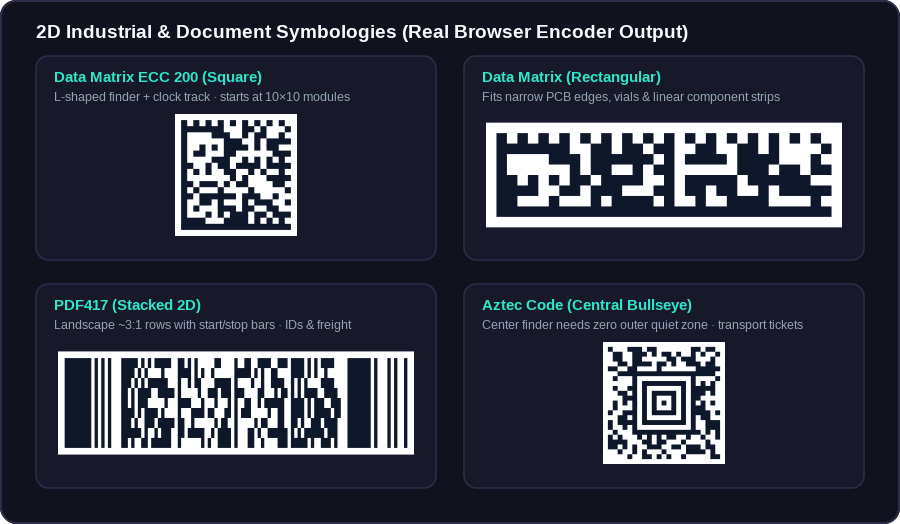
Aztec Code symbol generated locally—notice the central square bullseye compared to Data Matrix’s L-border and PDF417’s stacked bars.Aztec vs QR vs Data Matrix at a glance
| Symbology | Finder geometry | Quiet zone required? | Primary ecosystem |
|---|---|---|---|
| Aztec Code | Central concentric square bullseye | No fixed margin (0–2 modules safe) | Airlines (IATA BCBP), railways, transit wallets |
| Data Matrix ECC 200 | Solid outer L-shape + clock track | At least 1 module all around | Medical UDI, electronics PCBs, laser metal DPM |
| QR Code | Three corner finder squares + timing | Minimum 4 modules all around | Consumer smartphones, public URLs, payments, WiFi |
Checklist for screen & pass validation
- Never overlay badges onto the bullseye: unlike Level-H logo QR codes, covering the center of an Aztec code destroys its sole finder pattern immediately.
- Keep phone pass margins clean anyway: even though ISO allows zero margin, leaving 1–2 modules prevents screen borders or wallet UI cards from visually touching outer rings.
- Test at realistic phone brightness: scratched screen protectors and low backlight reduce contrast on thermal turnstile cameras.