


Quick answer
If the code still decodes, copy the content and generate a new, clean code. That is more reliable than trying to sharpen damaged pixels. If it no longer decodes, find the original file or ask the code's publisher for a replacement; image enhancement cannot guarantee recovery.
You can check the image first with the free QR code scanner. It decodes locally in your browser and shows the content before you open a link.
Start with the source of the blur
- The digital file: soft edges remain visible when the code sits still on screen.
- The printed object: the digital file is crisp, but the physical code has bleeding ink, reflections or too little detail.
- The camera: the code is clear to your eye, but the photo is out of focus or affected by motion.
Test the original file on screen before changing the print. If that file fails, replacing the printer will not solve the underlying problem.
Low-resolution files and incorrect resizing
A QR code is a grid of modules. When a small image is enlarged with smooth resampling (causing a soft or unintended pixelated QR code after scaling or heavy JPEG compression), the sharp boundary between two modules becomes a muddy grey gradient. A scanner then has to guess where one module ends and the next begins.
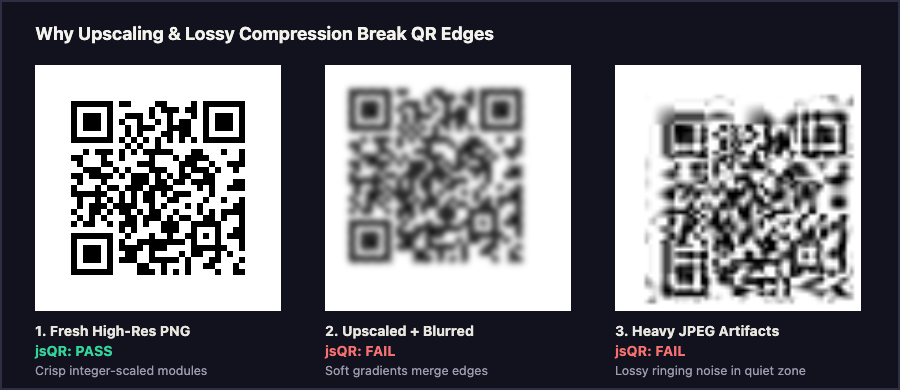
jsQR on the exact panels above for https://qracade.com: the fresh integer-scaled PNG decodes immediately, while both the upscaled blurred copy and heavily compressed JPEG fail to decode.Do not enlarge a small screenshot to make a poster. Go back to the original content and export at the required dimensions. QRacade's PNG generator creates a fresh high-resolution raster file, while the vector QR generator offers SVG, PDF and EPS for workflows that accept them.
Also check the whole production file, not just the original download. Design software, document exporters and messaging apps may compress or resize the code after export.
Screenshots and messaging-app compression
A lossless screenshot of a large code can work perfectly. The trouble starts when the code occupied only a small part of the screen, the screenshot is cropped and enlarged, or a chat service sends a compressed version.
- Ask for the original image or use the download button rather than a screen capture.
- Send the file as a document when the app offers that option, instead of as a compressed photo.
- Crop away unrelated surroundings without scaling the code unevenly.
- Keep the blank margin around the code; do not crop into the quiet zone.
Blur caused by printing
Ink spread, low print resolution, textured paper and glossy laminate can merge or obscure modules. A code that reads on a monitor may therefore fail on paper.
- Print at the final size; do not print a small proof and enlarge it later.
- Use a fresh high-resolution PNG or an appropriate vector format, not an enlarged thumbnail.
- Prefer a matte material and strong dark-on-light contrast.
- Keep dense codes larger. More data means more modules packed into the same grid.
- Test the exact paper, ink and finish under the lighting where people will scan.
See the printing guide for size, DPI, materials and a test-print checklist.
When the camera is the problem
Tap to focus, hold the phone steady and fill a useful part of the frame with the whole code. Clean the lens and reduce glare. Move slightly closer or farther away; being too close can prevent focus just as being too far away can leave too little detail.
Try a second phone. If another device reads the same code immediately, investigate the first camera or scanning app rather than altering the code.
Can you unblur a QR code?
Mild blur may occasionally be improved enough for a decoder, but sharpening cannot know the original value of information that has been merged or lost. AI image tools can also invent plausible-looking edges that no longer represent the original code.
The reliable workflow is:
- Try the image scanner on the sharpest available version.
- If it decodes, copy the content and generate a fresh code.
- If it does not, obtain the original file or ask the owner to publish a replacement.
- Test the new download, the final layout and a physical proof separately.
If your goal is privacy, do not just blur the code
Repairing an unreadable code and deliberately hiding one are different tasks. Partial blur can leave a code decodable, and some restoration methods may recover more than expected. Before sharing an image containing a ticket, payment code, WiFi credential or other sensitive QR, cover the complete code with a solid opaque shape. Check for repeated or reflected copies elsewhere in the image.
Frequently asked questions
Can you unblur a QR code?
Sometimes mild blur can be improved enough for a decoder, but no method reliably reconstructs lost module information. Decode and regenerate when possible; otherwise request the original.
Why is my QR code blurry after printing?
Common causes are enlarging a small PNG, low printer resolution, ink spread, glossy reflections and a final size that is too small. Export afresh and test on the final material.
Does taking a screenshot make a QR code blurry?
Not necessarily. A screenshot can preserve a code well, but cropping, scaling and messaging-app compression can soften its edges. Use the original download when available.
Is blurring a QR code a safe way to hide its contents?
Do not rely on blur for sensitive information. Cover the entire code and any duplicates with an opaque shape before sharing the image.
Related tools and guides
Test a QR code
Decode an upload and inspect contrast, quiet zone and image size.
Tool
Generate a sharp PNG
Export a fresh high-resolution code instead of enlarging an old one.
GeneratorWhy won't my QR code scan?
Check the other common causes beyond blur.
TroubleshootingPrinting QR codes
Size, resolution, placement and a final-print checklist.
Printing